Main image
Click to view image in fullscreen
![]()

Lieber Neptun-Kunde, herzlich willkommen auf YOULAP.
Wir sind der Vertriebspartner von Projekt Neptun für HP, Lenovo und Microsoft und hoffen, dass du etwas Passendes bei uns findest.
Docking Stations
986-000020
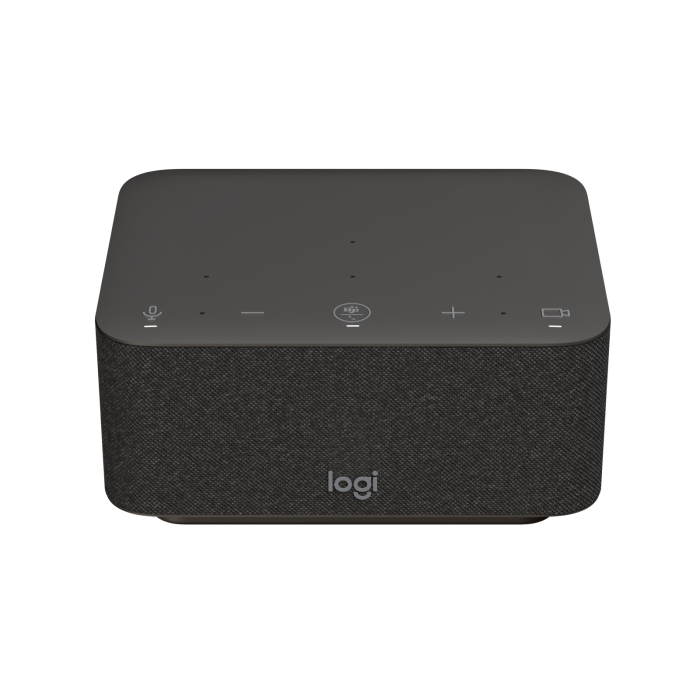
Logitech Logi docking station
All-in-one docking station with controls for meetings and speakerphone
Need help with the selection?
CHF 355.00
In stock

Description
OVERVIEW
Working from home shouldn't be a compromise. Logi Dock is an all-in-one docking station that simplifies home workspace setup, reduces desk clutter and increases productivity for out-of-office workers. Certified for leading video conferencing platforms and easy to set up, Logi Dock connects everything in a single, tidy unit that eliminates the need for additional peripherals and removes cable clutter.
MORE ORDER ON THE DESK
Work unhindered. Logi Dock connects and charges up to five USB peripherals and two monitors, replacing unnecessary chargers and power cables and keeping your desk tidy. Whether you're using a Mac, PC or Chromebook™, Logi Dock lets you optimize your home office and work more productively.Take CONTROL OF YOUR MEETINGS
Take advantage of Logi Dock's calendar integration to instantly join a meeting with the simple press of a button.Press the mute button to quickly turn audio on or off. Use the volume controls to set the optimal volume.
Press Logi Dock's video button to instantly turn your camera on or off.
HEAR AND BE HEARD CLEARLY
The integrated speakerphone includes six beamforming microphones that capture your voice clearly, while advanced algorithms suppress unwanted background noise.If you want to redirect the audio from the Logi Dock speakerphone to your own device, simply turn on your Zone Wireless headset or plug in the Zone True Wireless Earbuds. Logi Dock will then switch automatically.
WORK IS EASIER WITH MUSIC
If music is your ideal work companion, enjoy it with small but powerful speakers that deliver impressive stereophonic sound, powerful bass and a high volume that you can turn all the way up. Enjoy your favorite tracks distortion-free, carefully tuned and crystal clear.CONNECT ALL YOUR DEVICES
Keep your desk tidy and clutter-free with a simple solution that connects your devices, powers your laptop with up to 100W and reduces the number of chargers, cables and adapters. Connect up to five USB peripherals and two monitors via USB-A, USB-C, HDMI and DisplayPort. Pair your smartphone or tablet via Bluetooth® to stream audio.The UPGRADE FOR LOGI DOCK: LOGI TUNE
Logi Tune is the app that takes Logi Dock from great to extraordinary. By synchronizing your calendar with Logi Dock, Tune makes it easy to keep track of your day, notifies you of upcoming appointments and lets you quickly join meetings with the touch of a button. Tune also lets you customize Logitech business webcams and Zone headsets to ensure you look and sound your best in video conferences.READY TO USE
Logi Dock is compatible with Microsoft Teams®, Google Meet™, Google Voice™, and Zoom®. It is also compatible with popular phone applications on most platforms and operating systems within your IT environment. And because it's easy to set up, you can deploy Logi Dock to your remote and hybrid workforce with confidence.LOGITECH PRODUCTS FIT TOGETHER PERFECTLY
Logitech's collaboration products are designed to work well together (with minimal setup required). Create a wireless workspace with Logi Dock by pairing Zone Wireless products directly and connecting a Logitech wireless keyboard and mouse to a Unifying receiver. This frees up USB ports for other devices, such as your webcam.Specifications
Product Details
- SKU 986-000020
Design
- Product color Graphit
General
- Manufacturer Logitech
- Business Line Workplace
- Service Line Hardware
Connections
- Number of HDMI ports 1
- HDMI-Version 2.0
- Ethernet LAN (RJ-45) No
- USB type A 2
- DisplayPorts quantity 1
- USB Type C 3
Other
- Energy source AC
Sensors_security
- Cable lock slot Yes
Software
- Windows operating systems supported Windows 10, Windows 11
- Mac operating systems supported Mac OS X 11.0 Big Sur, Mac OS X 12.0 Monterey
- Other operating systems supported ChromeOS
Weight and Dimensions
- Width 160 mm
- Depth 131.5 mm
- Height 84.8 mm
- Weight 0.942 kg