Main image
Click to view image in fullscreen
![]()

Lieber Neptun-Kunde, herzlich willkommen auf YOULAP.
Wir sind der Vertriebspartner von Projekt Neptun für HP, Lenovo und Microsoft und hoffen, dass du etwas Passendes bei uns findest.
Webcams
960-001746
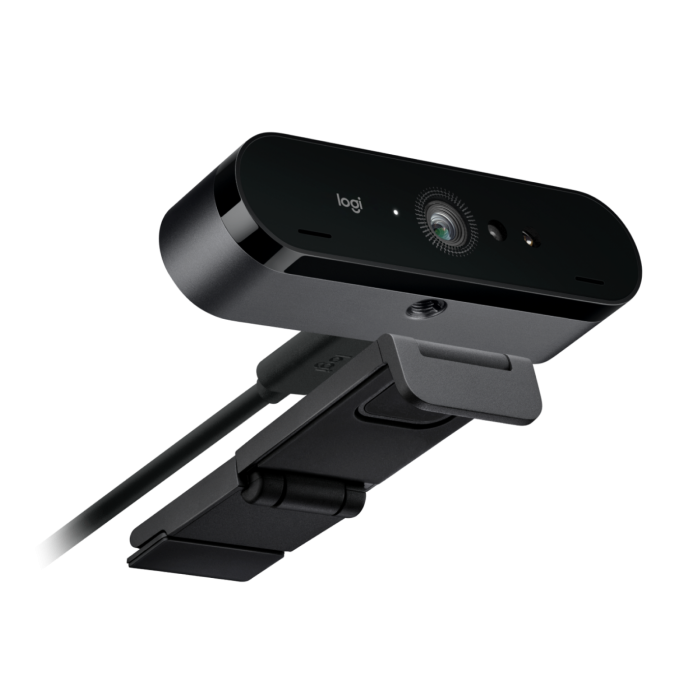
Logitech BRIO 4K Webcam
Ultra HD webcam with Windows Hello support
Need help with the selection?
CHF 135.00
In stock

Description
OVERVIEW
Brio 4K streams crystal-clear video with outstanding resolution, colour and detail, including autofocus and 5x digital zoom. Brio 4K delivers Ultra HD video at 30 fps, HD 1080p at up to 60 fps and HD 720p at up to 90 fps for ultra-smooth recordings or streams.
LOOK GOOD IN ALL LIGHTING CONDITIONS
Meet, stream and record with Brio 4K in any light and always look your best. From low light to bright sunlight, RightLight 3 automatically adjusts to always highlight the most important subject: you.SECURITY AND CONVENIENCE
Powered by both optical and infrared sensors, Brio 4K enables fast and secure facial recognition for Windows Hello. No need to enter a password to log in to Windows: just look into the webcam lens and you're logged in.CERTIFIED FOR BUSINESS APPLICATIONS
Brio 4K is certified for Microsoft Teams, Zoom and Google Meet, enables secure facial recognition for Windows Hello and is compatible with other popular applications.ADJUSTABLE FIELD OF VIEW
Choose from three preset fields of view (FOV) to perfectly frame your video.5This feature requires Logi Tune. Logi Tune is available on Windows and macOS at logi.com/tune. For an ideal head and shoulder view, select the 65° diagonal setting. To include more of the background, use the 78° or 90° diagonal setting. Whichever dFOV setting you choose, you'll get a closer look with 5x digital zoom in spectacular 4K resolution.REMOVABLE COVER
A flip-up privacy cover is included with the Brio 4K to protect the lens and ensure privacy and peace of mind when the webcam is not in use.CLEAR SOUND IN ANY ENVIRONMENT
Brio 4K features two built-in omnidirectional microphones with noise-cancelling technology. The microphones capture audio clearly from up to 1.2 metres away without amplifying background noise, so conversations always sound natural and clear.EASY DEPLOYMENT AND MANAGEMENT
Configure Brio 4K and other Logitech video collaboration devices in one place and install the latest firmware updates with Logitech Sync. Monitor rooms, devices and peripherals from anywhere and resolve issues before they disrupt a meeting.EVERYTHING UNDER CONTROL WITH TUNE DESKTOP
The Logi Tune desktop app simplifies control and customisation of personal devices on select models, including Brio 4K. The mini app discreetly ensures uninterrupted video communication with features such as: zoom in and out, colour presets, colour correction, manual focus adjustment and easy firmware update downloads.VERSATILE MOUNTING OPTIONS
Securely attach Brio 4K with the adjustable clip where it works best – monitor, laptop or table – or remove the clip to attach it to your own tripod with the integrated thread.Specifications
Product Details
- SKU 960-001746
General
- Manufacturer Logitech
- Business Line Networking
- Service Line Hardware
Design
- Product color Black
Graphics
- Supported video modes 720p, 1080p, 2160p
- Max. video resolution 4096 x 2160 Pixel
- Maximum frame rate 90 fps
- Camera HD type 4K Ultra HD
Connections
- Interface USB
- Mounting type Clip / Ständer
- Built-in microphone Yes
Audio / Video
- Number of microphones 2
- Microphone pick-up range 1.2 m
- Resolution at capture speed 1280x720@90fps, 1920x1080@60fps, 4096x2160@30fps
- Zoom capability Yes
- Diagonal field of view 90 °
Software
- Windows operating systems supported Windows 10, Windows 11
Weight and Dimensions
- Width 102 mm
- Depth 26.5 mm
- Height 27 mm
- Weight 0.085 kg
Other
- Sustainability certificates Forest Stewardship Council (FSC)