
Wir sind der Vertriebspartner von Projekt Neptun für HP, Lenovo und Microsoft und hoffen, dass du etwas Passendes bei uns findest.
3Dconnexion SpaceMouse Pro Wireless
Perfect for you if you work several hours a day in 3D or CAD applications
In stock

Description
BLUETOOTH® EDITION
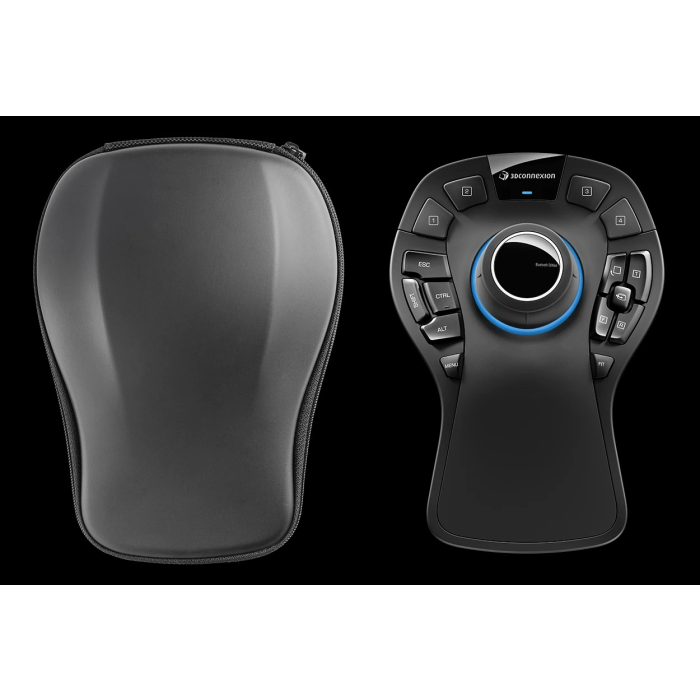
The SpaceMouse Pro Wireless comes with Bluetooth®️ connection, universal receiver and a customized carrying case, making it the right choice for professional designers who want to benefit from advanced features without compromising on comfort.
MORE FLEXIBLE. MORE SUSTAINABLE. MORE VERSATILE.
SpaceMouse Pro Wireless is designed specifically for engineers, architects, 3D artists and designers for a wireless desktop or on the go. It has the performance, versatility and customizability that only a 3Dconnexion product can offer.
IMMERSIVE 3D NAVIGATION
Thanks to the 3Dconnexion controller cap with 6 degrees of freedom (6DoF), you can immerse yourself in your projects better than ever before. By gently pushing, pulling, rotating or tilting the cap, you can interact effortlessly with 3D drawings, objects and environments. This leaves your other hand free and you can easily use a standard mouse to edit your model at the same time. This way of working is simple, intuitive and allows professional users to immerse themselves in their work in a completely different way.
The SpaceMouse Pro Wireless supports all industry-leading CAD and 3D applications.
WIRELESS FREEDOM
The SpaceMouse Pro Wireless provides a fast connection via Bluetooth® Low Energy, 3Dconnexion 2.4GHz wireless technology or via cable to interact with your 3D content in real time. The device can be connected to the PC via Bluetooth, the 3Dconnexion Universal Receiver or the Keyboard Pro, ensuring the same reliability and responsiveness as a wired product.
The SpaceMouse Pro Wireless can be used for up to one month* before it needs to be recharged via USB-C. It comes in a customized carrying case and is ready to use anytime, anywhere.
MORE ERGONOMICS AND EFFICIENCY AT THE CAD WORKSTATION
If a computer mouse is used intensively with repetitive movement patterns, this can lead to pain and functional impairments, also known as RSI syndrome or "mouse arm".
Working with two hands - with a 3D mouse in one hand and a conventional mouse in the other - helps to prevent these symptoms while making your workflow much more efficient and healthy.
PROFESSIONAL PERFORMANCE AT THE TOUCH OF A BUTTON
The SpaceMouse Pro Wireless automatically recognizes application environments. Users have four intelligent 3Dconnexion buttons at their disposal, which are pre-assigned with application-related commands and make working even smarter.
An on-screen display shows the commands assigned to the 3Dconnexion buttons so that you always know how to use the buttons.
EFFICIENCY MEETS ERGONOMICS
The keyboard modifiers of the SpaceMouse Pro Wireless provide easy access to the Ctrl, Shift, Alt, Esc functions. They save you unnecessary reaching for the keyboard and therefore time. The hard-wearing surface coating provides the durability that professional users can expect without compromising on comfort.
To make even the longest and most challenging design projects efficient and enjoyable, all 15 configurable buttons on the SpaceMouse Pro Wireless are positioned to ensure effortless access to frequently used commands.
QUICKVIEW BUTTONS: VIEW EVERY ANGLE
SpaceMouse Pro's QuickView buttons provide quick access to 12 views, making it easier for you to visualize errors, explore alternatives and present designs. The rotation function can be deactivated at the touch of a button, allowing you to move, zoom in or out of your model without rotation.
Specifications
Product Details
- SKU 3DX-700119
General
- Angebote / Flags Neptun Price
- Manufacturer 3DConnexion
- Service Line Other
Keyboard
- Keyboard included No
Design
- Product color Black
Input
- Battery charge indicator No
Connections
- Cable length 1,5 m
- Connectivity Bluetooth
Akku / Strom
- Charging stand No
Other_nodisplay_settings
- Business Line Other
Software
- Windows operating systems supported Windows 10, Windows 7, Windows 8.1
- Mac operating systems supported Mac OS X 10.10 Yosemite, Mac OS X 10.11 El Capitan, Mac OS X 10.12 Sierra, Mac OS X 10.13 High Sierra, Mac OS X 10.14 Mojave