
Wir sind der Vertriebspartner von Projekt Neptun für HP, Lenovo und Microsoft und hoffen, dass du etwas Passendes bei uns findest.
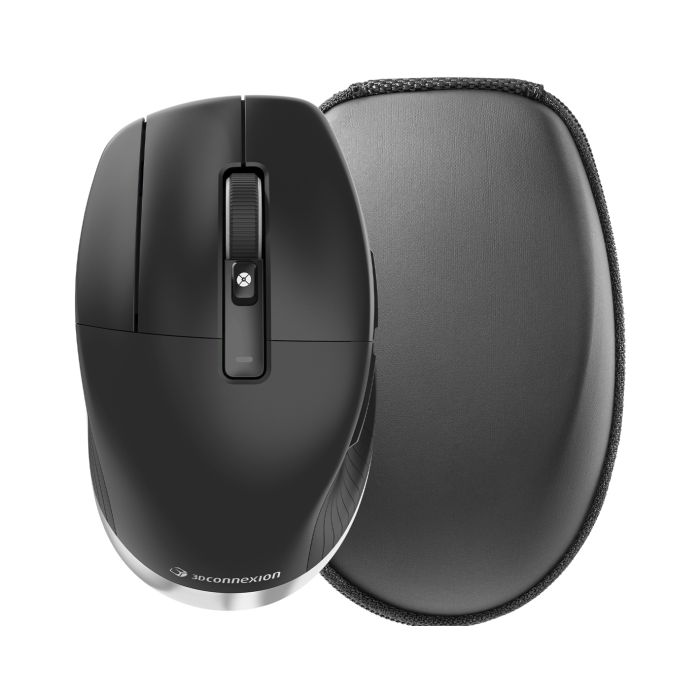
3Dconnexion CadMouse Pro Wireless Links
Ergonomics and precision in a left-sided optimized housing
In stock

Description
A MASTERPIECE OF PRODUCT DESIGN. THREE AWARDS.
The CadMouse Pro Wireless has received three of the world's most important design awards: the Good Design Award, the iF Design Award and the Red Dot Design Award.
This triple award confirms the excellent work of our product designers and engineers. They have perfected the CadMouse Pro Wireless and created a future-oriented, technical product that has been developed with attention to detail and through continuous research for the best material with absolute precision. The result is the perfect balance of ergonomic shape and pure aesthetics.
PROFESSIONAL ERGONOMIC DESIGN
The CadMouse Pro Wireless is designed to work comfortably in CAD applications for extended periods of time. The ergonomic design prevents muscle and tendon strain that can occur during long CAD sessions.
THE KEY FOR CAD PROFESSIONALS
The middle mouse button was specially developed for users who need a third button to access functions. With an average of 60 g less force required than clicking the scroll wheel, the middle mouse button is ideal for CAD applications.
MORE COMFORT, LESS STRAIN
The inclined surface creates a more natural hand position, preventing muscle and tendon strain that is common with conventional mice.
THE IDEAL THUMB REST
The generous thumb rest harmonizes with any thumb and provides a comfortable place to rest it as well as easy access to the side thumb buttons.
CONCAVE KEY SHAPE
The concave shape of the three mouse buttons puts the fingers in an ideal position and provides a natural and comfortable feel.
A NATURAL EXTENSION OF YOUR HAND
The combination of ergonomic full-size design and intelligent software ensures an intuitive and simple workflow.
DURABLE COMPONENTS
During an average working day, CAD users click many thousands of times. Designed with you in mind, the CadMouse Pro Wireless allows for more than 50 million button clicks and offers the durability expected from a premium product. The low-friction feet made of polytetrafluoroethylene (PTFE) enable smooth, precise mouse movements even after long periods of use. The three-year warranty promises what the mouse delivers - an exceptionally long service life.
HIGH PRECISION & PERFORMANCE
The high-precision and energy-efficient optical sensor ensures that the mouse cursor follows your hand movements exactly. This is made possible by the high resolution and adaptive scanning frequency. Together with the specially developed feet made of polytetrafluoroethylene (PTFE), an optimized ratio of static and dynamic friction guarantees continuous tactile feedback, which in turn is another guarantee for constant precision and smooth mouse movements.
TRIPLE CONNECTIVITY
The CadMouse Pro Wireless offers you flexible connectivity options: Bluetooth® Low Energy, the 3Dconnexion Universal Receiver, or a USB-C cable.
EFFECTIVE ZOOM AND SCROLL NAVIGATION IN CAD APPLICATIONS
CAD users need to be able to zoom precisely in 3D environments and browse long documents in a controlled and efficient manner. Thanks to the improved 3DxWare 10 driver software, the optimally placed QuickZoom buttons and the advanced 2nd generation mouse wheel, you can control your drawings and 3D designs even more precisely and use simple document navigation tailored to your needs.
SMART MOUSE WHEEL 2
The controllable scroll speed in browsers and large documents is ideal for finding specific content quickly and easily.
QUICKZOOM
Click the front thumb button to zoom into object details in the center and the back button to zoom out again. To fine-tune, hold down the corresponding button.
EASY ACCESS TO APPLICATION COMMANDS
Use the radial menu button to open an application or environment-specific menu. It provides direct access to your favorite commands that can be executed with a simple gesture movement - either by moving the mouse cursor over them or by clicking on the command directly.
Specifications
Product Details
- SKU 3DX-700117
General
- Angebote / Flags Neptun Price
- Manufacturer 3DConnexion
- Service Line Hardware
Keyboard
- Connectivity technology Verkabelt & Kabellos
- Wireless receiver interface USB Typ-A
- Bluetooth Low Energy (BLE) Yes
- Keyboard included No
Mouse
- form factor Linken
- Buttons quantity 7
- Movement detection technology Optisch
- Scroll type Rad
- Buttons type Gedrückte Tasten
- Purpose of the mouse Büro
Design
- Product color Schwarz, Silber
Input
- Battery charge indicator No
- Receiver included Yes
Connections
- Cable length 1,5 m
- Connectivity RF Wireless + Bluetooth
Akku / Strom
- Battery capacity 1100 mAh
- Battery technology Lithium Polymer (LiPo)
- Charging stand No
- Rechargeable Yes
Other_nodisplay_settings
- Business Line Workplace
Software
- Windows operating systems supported Ja
- Mac operating systems supported Ja
Weight and Dimensions
- Width 74 mm
- Depth 126 mm
- Height 44 mm
- Weight 0.14 kg
Ergonomics
- Plug and Play Yes